Quote:
Originally Posted by Crono

eh tried to run it for once and it said java isnt recognized as an internal or external blahblah
i already have jre installed
|
Try adding jre to your system's 'Path' variable.
(This is for windows 7, it should be similar for all other windows based OSs)
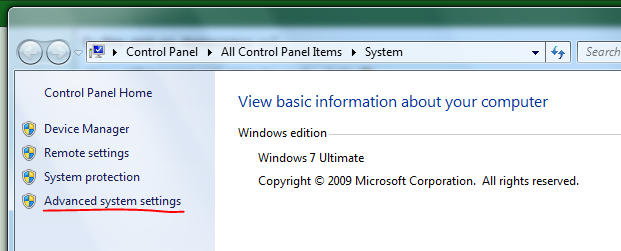
Go to Control Panel -> System -> Advanced system settings.
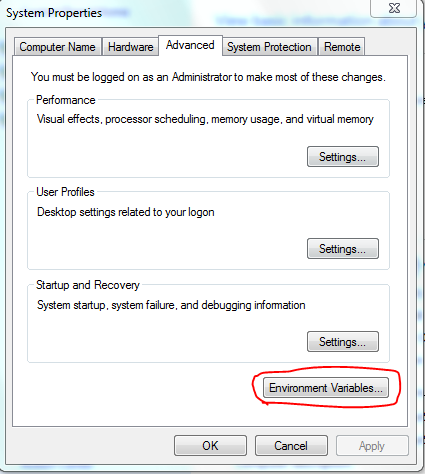
Then click on the Environmental Variables button on the Advanced tab.
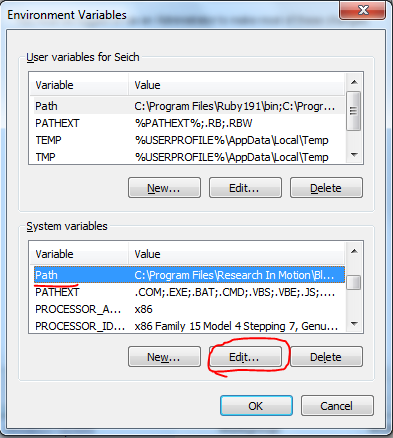
Look for the Path Variable in System variables.
Once you find it click on edit then, try adding something like: ";C

Program Files\Java\jre6\bin" to the end of the string in the variable value textbox. Make sure to have the semi-colon dividing it from the variable that's before this new one.
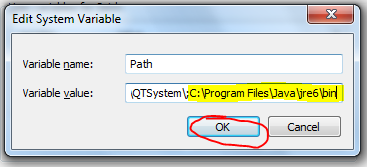
Then click ok and ok again and try it. Hopefully it should work now.